

Let's start!
On this page you can find information about:
What happens during a study term
As the start of the semester, and as the course starts, it's important that you as a teacher and / or program manager, support the students with information so that they can get a good start in their studies. This page contains information and tips for you of how to facilitate that work.
What happens during the start of the semester?
Important dates of the academic calender
The first day at the start of the term is intended to be an opportunity where programme students are scheduled to meet teachers and other students and have a first day to be welcomed at University West and to their studies. Tips and more information on how such a day can be set up can be found further down in this guide
Autumn term start
During the start of autumn term the university arrange plenty of support. Staff are available who can answer your students' questions about their education. During the first day, the students are supported in finding the designated room according to the set schedule and receives support in creating a West Card.
Spring term start
During the start of spring term the university recieves fewer new students on site than at the start of the autumn term. There will be some extra staff to support the students, we refer also to the Service Center.
Smygstart - Sneak Start
Smygstart is arranged for all national students both before the spring and autumn semester, the week before the semester begins. During this days, students get lots of good tips and are instructed of things they need to know as a new student! Former students can also participate in this. During the week, Introduction days also take place for our international students and activities are synchronized if possible.
Here you can read more about Smygstartsveckan
Start up your course
How to start up your Canvas course
Canvas pages are created automatically and are then available to students when they have registered (starting in early August). The courses in Canvas are created on June 10 before HT and 8 weeks before the start of the course for VT.
Keep in mind that;
- Check that the correct bibliography and syllabus are linked to the canvas page of the course (8 weeks before the start of the course, the correct version must be determined).
- It is important to have a welcome greeting to your students on the Canvas course, it must be in place when the course is published for students 4 weeks before the start of the course. Students should feel welcomed by the text and get the feeling that they know what the course/programme entails. Also describe how the first opportunity of the course is held in terms of date and time as well as location/link to the Zoom room and any literature connected to the opportunity.
- If necessary, add other teachers who will teach the course (teachers who are scheduled in Planum are automatically added to the course).
- Check that the correct bibliography and syllabus are linked to the canvas page of the course (8 weeks before the start of the course, the correct version must be determined).
- Publish the course PM (2 weeks before course start).
Learn more about Canvas
- There is an introduction module in Canvas - here the student will find most of what is needed to get started with their studies. This module is automatically added to all Canvas courses.
- Introductory course to Canvas for educators and general information about Canvas at University West.
- Each Canvas course has its own Zoom Room. Click into the meeting in the usual way and then become a participant in the meeting. To take over the hosting of the e-meeting, use a host key provided in the course. Read more about how to access host key for Zoom (website).
Tips and tricks on educating in a digital environment (Akademus).
Course information
The Course information page (In Swedish) gives you an overview of the course and you can directly see the course plan, reading list, test sessions, which teachers are connected to the course and schedule, as well as closer to the start of the course, and also see how many students have been on the course's Canvas page.
What to think about the schedule before the start of the semester
As a teacher, you will find the schedule in the Canvas calendar or in the course overview. You can also go to the module "Courses" in the Employee Portal to find the link to KronoX.
Students find their schedule in the calendar in Canvas - check that this is displayed correctly. Keep in mind that activities that you add to the Canvas course become part of the student's schedule. This can be, for example, assignments and supervision times. NOTE: Activities that are added to the Canvas calendar are not synced to KronoX.
In the Canvas calendar, you can choose how you want to view the schedule. Feel free to try to choose between the "Week", "Month" and "Agenda" views in the calendar to find the layout that suits you best
Check that the schedule is correct in the course (4 weeks before the start of the course it is available)
What information do students receive before the education?
Information that the students recieve from the university:
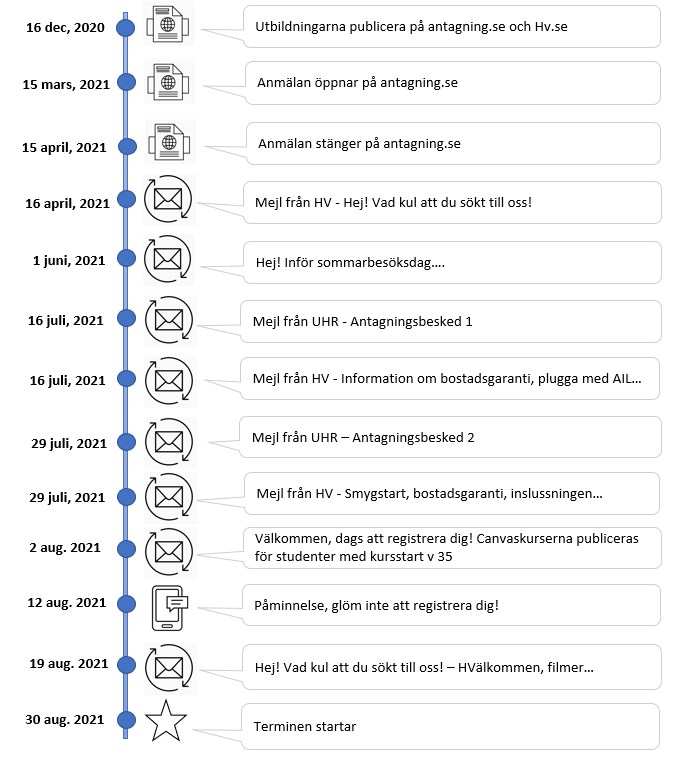
- Dispatch / newsletter (see when and what information the student receives on his journey to the university in picture no. 1)
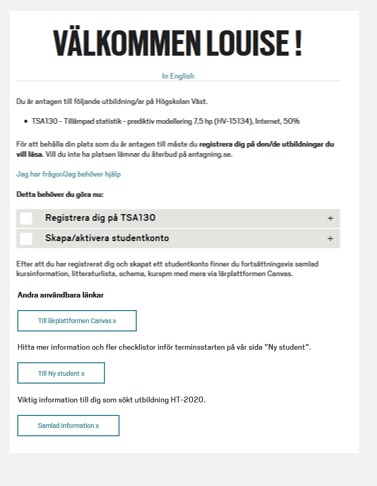
- Welcome page (see example of a personal start page in picture no. 2)
- Students receive a regular newsletter during the term.
Example of information that is sent to the student - from registration to the start of education (Picture no. 1).
Example of a personal start page (Image 2).